
Web quickstart
Follow real official-example screenshots to exchange online messages, then expand application integration code as needed.
Use 2.0.5 to exchange online messages between Alice and Bob in separate clients.
1. Prepare
| Item | Requirement |
|---|---|
| Browser | WebSocket, TextEncoder, and TextDecoder |
| WuKongIM cluster | Single-node or multi-node cluster; healthy /readyz and a browser-reachable WebSocket Gateway |
| Application BFF | Validates the product session and returns the current user's uid, short-lived token, and websocketUrl; same origin or deliberate cross-origin policy |
Start the test page through the official example. Use temporary test accounts and separate Alice and Bob clients. The code below integrates your own application.
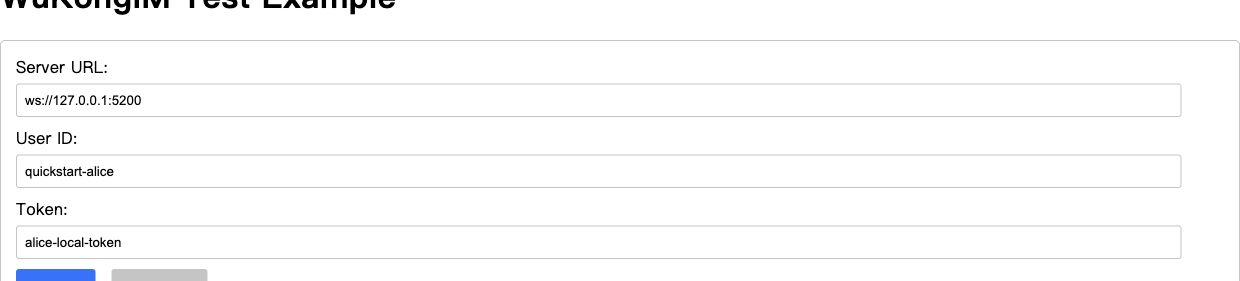
① WebSocket address. ② Current UID, with its matching temporary token. ③ Connect. This is the official test tool; production applications obtain credentials from a BFF.
Read Identity & Token. Use HTTPS/WSS in production and keep tokens out of URLs, Local Storage, logs, and analytics. The default device category is WEB 1; backend device_flag must match (APP 0, PC 2).
2. Install the SDK
Run in a bundled application such as Vite or Next.js, then commit the lockfile:
npm install --save-exact easyjssdk@2.0.53. Connect and listen
/api/im/bootstrap is your product route, not WuKongIM HTTP API. The browser never calls /user/token or /route directly; server credentials, route selection, and response filtering stay in the BFF.
Place the following three code blocks in one TS module, in order: fetch connection material, create the connection owner, then bind the page.
① Fetch BFF connection material
interface IMBootstrap {
  uid: string;
  token: string;
  websocketUrl: string;
}

async function fetchIMBootstrap(): Promise<IMBootstrap> {
  const response = await fetch('/api/im/bootstrap', {
    credentials: 'include',
    cache: 'no-store',
    headers: { accept: 'application/json' },
  });
  if (!response.ok) throw new Error(`IM bootstrap failed: ${response.status}`);
  return response.json() as Promise<IMBootstrap>;
}
② Complete connection wrapper: listeners, 10-second limit, and destruction
import { WKIM, WKIMChannelType, WKIMEvent, type RecvMessage } from 'easyjssdk';

export class EasyChatClient {
  private im?: WKIM;
  constructor(private readonly receiveMessage: (message: RecvMessage) => void) {}

  private readonly onConnect = (_result: unknown) => {
    console.info('EasySDK connected');
  };

  private readonly onDisconnect = (_info: unknown) => {
    console.info('EasySDK disconnected');
  };

  private readonly onMessage = (message: RecvMessage) => {
    this.receiveMessage(message);
  };

  private readonly onError = (_error: unknown) => {
    console.error('EasySDK operation failed');
  };

  async start(bootstrap: IMBootstrap): Promise<void> {
    this.stop();

    const im = WKIM.init(
      bootstrap.websocketUrl,
      { uid: bootstrap.uid, token: bootstrap.token },
      { singleton: false, debugLogging: false },
    );
    im.on(WKIMEvent.Connect, this.onConnect);
    im.on(WKIMEvent.Disconnect, this.onDisconnect);
    im.on(WKIMEvent.Message, this.onMessage);
    im.on(WKIMEvent.Error, this.onError);

    this.im = im;
    await this.connectWithin(im, 10_000);
  }

  private async connectWithin(im: WKIM, timeoutMs: number): Promise<void> {
    let timeout: ReturnType<typeof setTimeout> | undefined;
    try {
      await Promise.race([
        im.connect(),
        new Promise<void>((_, reject) => {
          timeout = setTimeout(
            () => reject(new Error(`EasySDK connect exceeded ${timeoutMs} ms`)),
            timeoutMs,
          );
        }),
      ]);
    } catch (error) {
      im.destroy();
      if (this.im === im) this.im = undefined;
      throw error;
    } finally {
      if (timeout) clearTimeout(timeout);
    }
  }

  async sendText(targetUid: string, text: string) {
    if (!this.im?.isConnected) throw new Error('EasySDK is not connected');

    return this.im.send(targetUid, WKIMChannelType.Person, {
      type: 1,
      version: 1,
      content: text,
    });
  }

  stop(): void {
    const im = this.im;
    if (!im) return;

    im.off(WKIMEvent.Connect, this.onConnect);
    im.off(WKIMEvent.Disconnect, this.onDisconnect);
    im.off(WKIMEvent.Message, this.onMessage);
    im.off(WKIMEvent.Error, this.onError);
    im.destroy();
    this.im = undefined;
  }
}
on and off use the same function reference. singleton: false prevents hot reload or multiple instances from destroying each other's connections. The full connection wait is bounded at 10 seconds and calls destroy on failure. An application normally owns one EasyChatClient.
Component lifecycle and diagnostic logging
React can hold the client in a root Provider and call stop() during Effect cleanup. Vue/Svelte use component or application unmount hooks. CONNECT has an internal request timeout, but WebSocket opening can still hang, so bound the full wait.
debugLogging: false is the default. Enable it only during controlled diagnosis. The SDK emits sanitized operational metadata; application callbacks and collectors must not log complete events, results, or payloads.
4. Exchange the first message
- Confirm Connected on both clients.
- Alice sends to Bob; confirm Message sent successfully on the sender.
- Confirm Message received on Bob; official test logs show only sequence and Channel type.
- Bob replies to Alice; verify reception in the reverse direction.
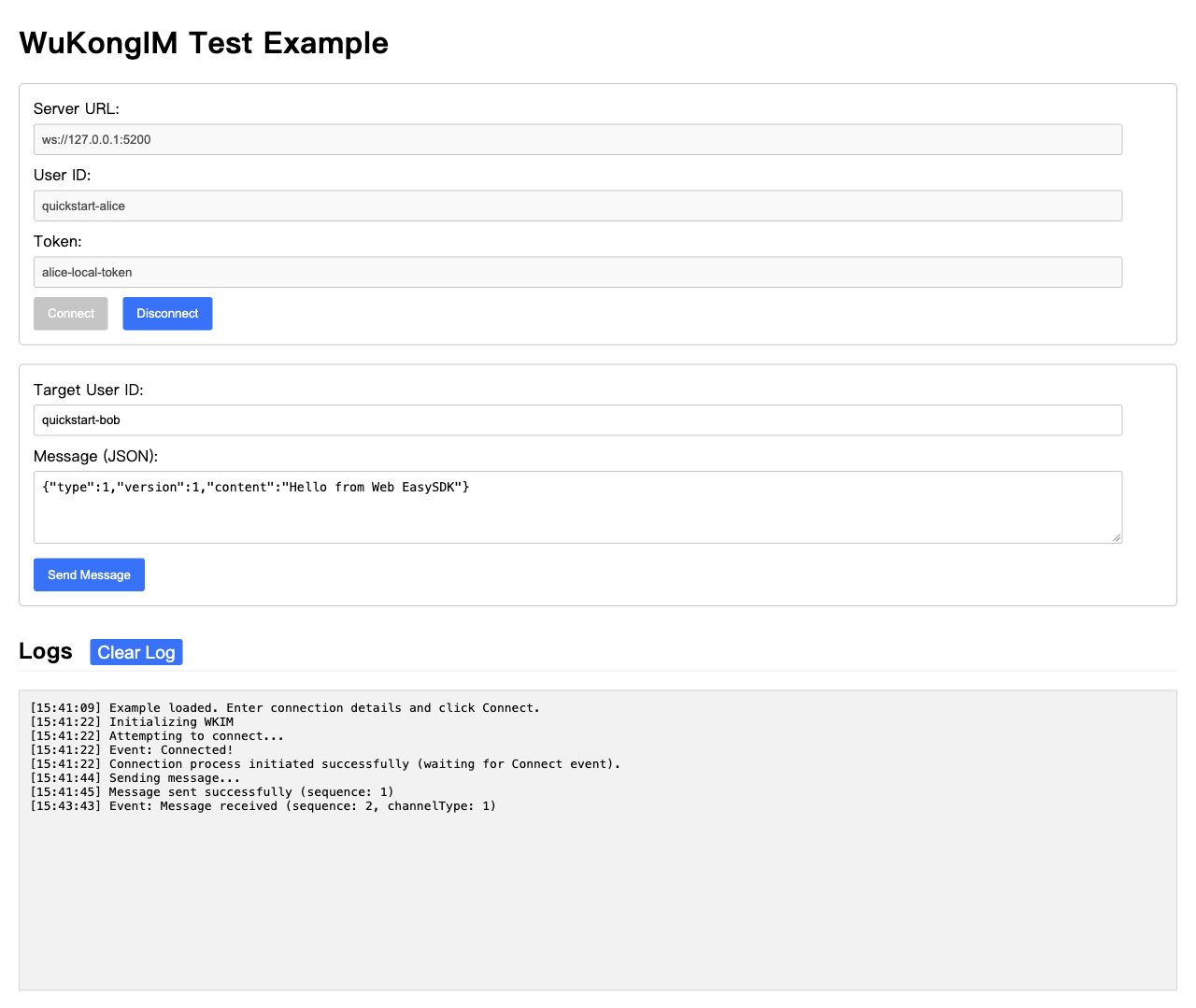
① Target the peer UID. ② Alice's send request succeeds. ③ Alice receives Bob's reply. Check sending and peer reception separately.
A resolved send Promise means the server returned a send result, not that the peer read or processed it. This page verifies online exchange; see SDK selection for offline recovery, conversations, and unread state.
③ Complete page button and receive-area example
Send after both clients connect. Alice targets bob; Bob changes it to alice. These represent your product UIDs and must match the BFF identities. In your own Message callback, check fromUid, channelId, messageId, and payload. Show only the latest message to avoid an unbounded history.
<button id="send-message" disabled>Send</button>
<pre id="received-message"></pre>
const output = document.querySelector<HTMLElement>('#received-message');
const button = document.querySelector<HTMLButtonElement>('#send-message');
if (!output || !button) throw new Error('Missing message UI');
button.disabled = true;
const chat = new EasyChatClient((message) => {
output.textContent = JSON.stringify({
fromUid: message.fromUid,
payload: message.payload,
});
});
window.addEventListener('pagehide', () => chat.stop(), { once: true });
try {
await chat.start(await fetchIMBootstrap());
button.disabled = false;
} catch {
chat.stop();
output.textContent = 'Connection failed';
}
button.onclick = async () => {
try {
// Bob sends to 'alice'. Click only after both clients are connected.
await chat.sendText('bob', 'Hello from Web EasySDK');
console.info('SEND completed');
} catch {
console.error('Send failed; check its outcome before retrying');
}
};5. Clean up
Call chat.stop() on logout, unmount, or page exit: off with the original callbacks, then destroy(). Page subscribers remove their handlers; the connection owner destroys the instance.
Additional verification: unreachable address and refresh
Confirm failure and destruction within 10 seconds with an unreachable address, without a permanent Connecting state. Refresh, close, or sign out and confirm the old instance removes listeners and is destroyed, leaving no duplicate connection.
6. Troubleshooting
| Symptom | Check first |
|---|---|
| Missing WebSocket or encoding APIs | Browser and build environment; browser support does not imply Mini Program support |
| Connection rejected | BFF-returned WSS address, token lifetime, certificate, proxy Upgrade, and Gateway reachability |
| Duplicate messages after refresh | Avoid on on every render; call off / destroy on unmount |
| Token or payload in Console | The actual SDK version in lockfile and bundle, plus application callbacks, error handling, and collectors |
Reproduce logging problems with the pinned npm artifact and retain only low-sensitivity evidence. SDK diagnostics are off by default and emit only sanitized operational metadata when enabled.
Next
Continue with messaging and production checks. Versions and validation records retain historical environments and scope; see API Versions & Compatibility for current boundaries.
Connecting a model? Follow Agent Streaming Replies to update one reply and keep model keys on your backend.