
Web 快速接入
跟着官方示例实图完成在线收发,再按需展开业务接入代码。
使用 2.0.5,让 Alice 与 Bob 在两个独立客户端中在线收发。
1. 准备接入
| 准备项 | 要求 |
|---|---|
| 浏览器 | 支持 WebSocket、TextEncoder、TextDecoder |
| WuKongIM 集群 | 单节点或多节点集群,/readyz 正常,浏览器可达 WebSocket Gateway |
| 业务后端 BFF | 验证产品 Session,返回当前用户的 uid、短期 token 和 websocketUrl;同源或正确配置跨域 |
先按运行官方示例启动测试页。使用临时测试账号,分别打开 Alice 与 Bob 两个客户端;下文代码用于自己的应用。
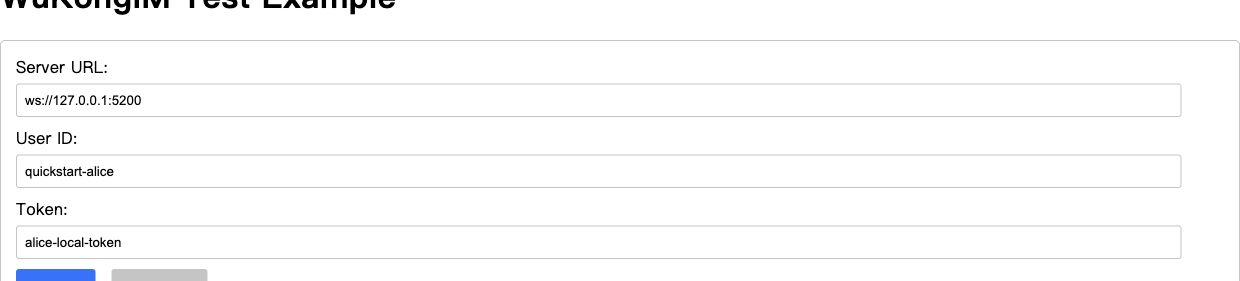
① WebSocket 地址。② 当前用户 UID,Token 使用匹配的临时凭据。③ Connect。此为官方测试工具界面;生产应用从 BFF 获取凭据。
先读身份与 Token。生产使用 HTTPS/WSS,不把 Token 写入 URL、Local Storage、日志或分析事件。SDK 默认设备类别为 WEB 1,后端 device_flag 必须一致(APP 0、PC 2)。
2. 安装 SDK
在 Vite、Next.js 等打包工程中执行,并提交锁文件:
npm install --save-exact easyjssdk@2.0.53. 连接与监听
/api/im/bootstrap 是你的产品接口,不是 WuKongIM HTTP API。浏览器不直接调用 /user/token 或 /route;服务端凭据、路由选择与响应筛选留在 BFF。
以下三个代码段按顺序放进同一个 TS 模块。先取连接材料,再创建连接所有者,最后绑定页面。
① 获取 BFF 连接材料
interface IMBootstrap {
  uid: string;
  token: string;
  websocketUrl: string;
}

async function fetchIMBootstrap(): Promise<IMBootstrap> {
  const response = await fetch('/api/im/bootstrap', {
    credentials: 'include',
    cache: 'no-store',
    headers: { accept: 'application/json' },
  });
  if (!response.ok) throw new Error(`IM bootstrap failed: ${response.status}`);
  return response.json() as Promise<IMBootstrap>;
}
② 完整连接封装:监听、10 秒超时与销毁
import { WKIM, WKIMChannelType, WKIMEvent, type RecvMessage } from 'easyjssdk';

export class EasyChatClient {
  private im?: WKIM;
  constructor(private readonly receiveMessage: (message: RecvMessage) => void) {}

  private readonly onConnect = (_result: unknown) => {
    console.info('EasySDK connected');
  };

  private readonly onDisconnect = (_info: unknown) => {
    console.info('EasySDK disconnected');
  };

  private readonly onMessage = (message: RecvMessage) => {
    this.receiveMessage(message);
  };

  private readonly onError = (_error: unknown) => {
    console.error('EasySDK operation failed');
  };

  async start(bootstrap: IMBootstrap): Promise<void> {
    this.stop();

    const im = WKIM.init(
      bootstrap.websocketUrl,
      { uid: bootstrap.uid, token: bootstrap.token },
      { singleton: false, debugLogging: false },
    );
    im.on(WKIMEvent.Connect, this.onConnect);
    im.on(WKIMEvent.Disconnect, this.onDisconnect);
    im.on(WKIMEvent.Message, this.onMessage);
    im.on(WKIMEvent.Error, this.onError);

    this.im = im;
    await this.connectWithin(im, 10_000);
  }

  private async connectWithin(im: WKIM, timeoutMs: number): Promise<void> {
    let timeout: ReturnType<typeof setTimeout> | undefined;
    try {
      await Promise.race([
        im.connect(),
        new Promise<void>((_, reject) => {
          timeout = setTimeout(
            () => reject(new Error(`EasySDK connect exceeded ${timeoutMs} ms`)),
            timeoutMs,
          );
        }),
      ]);
    } catch (error) {
      im.destroy();
      if (this.im === im) this.im = undefined;
      throw error;
    } finally {
      if (timeout) clearTimeout(timeout);
    }
  }

  async sendText(targetUid: string, text: string) {
    if (!this.im?.isConnected) throw new Error('EasySDK is not connected');

    return this.im.send(targetUid, WKIMChannelType.Person, {
      type: 1,
      version: 1,
      content: text,
    });
  }

  stop(): void {
    const im = this.im;
    if (!im) return;

    im.off(WKIMEvent.Connect, this.onConnect);
    im.off(WKIMEvent.Disconnect, this.onDisconnect);
    im.off(WKIMEvent.Message, this.onMessage);
    im.off(WKIMEvent.Error, this.onError);
    im.destroy();
    this.im = undefined;
  }
}
on 和 off 使用同一函数引用;singleton: false 避免多实例或热更新互相销毁连接。完整连接等待限时 10 秒,失败后 destroy。应用通常只持有一个 EasyChatClient。
组件生命周期与诊断日志
React 可在根级 Provider 持有客户端,Effect 清理时调用 stop();Vue/Svelte 在组件或应用卸载钩子里释放。SDK 的 CONNECT 请求有内部超时,但 WebSocket 打开阶段仍可能悬挂,因此需要限制完整等待。
debugLogging: false 是默认值。仅在受控诊断窗口开启;SDK 只输出脱敏运行元数据,应用回调与采集器也不得记录完整事件、结果或 Payload。
4. 收发第一条消息
- 两端都确认出现 Connected。
- Alice 发给 Bob;发送端确认 Message sent successfully。
- Bob 确认 Message received;官方测试日志只显示序号与频道类型。
- Bob 回发 Alice,验证反向接收。
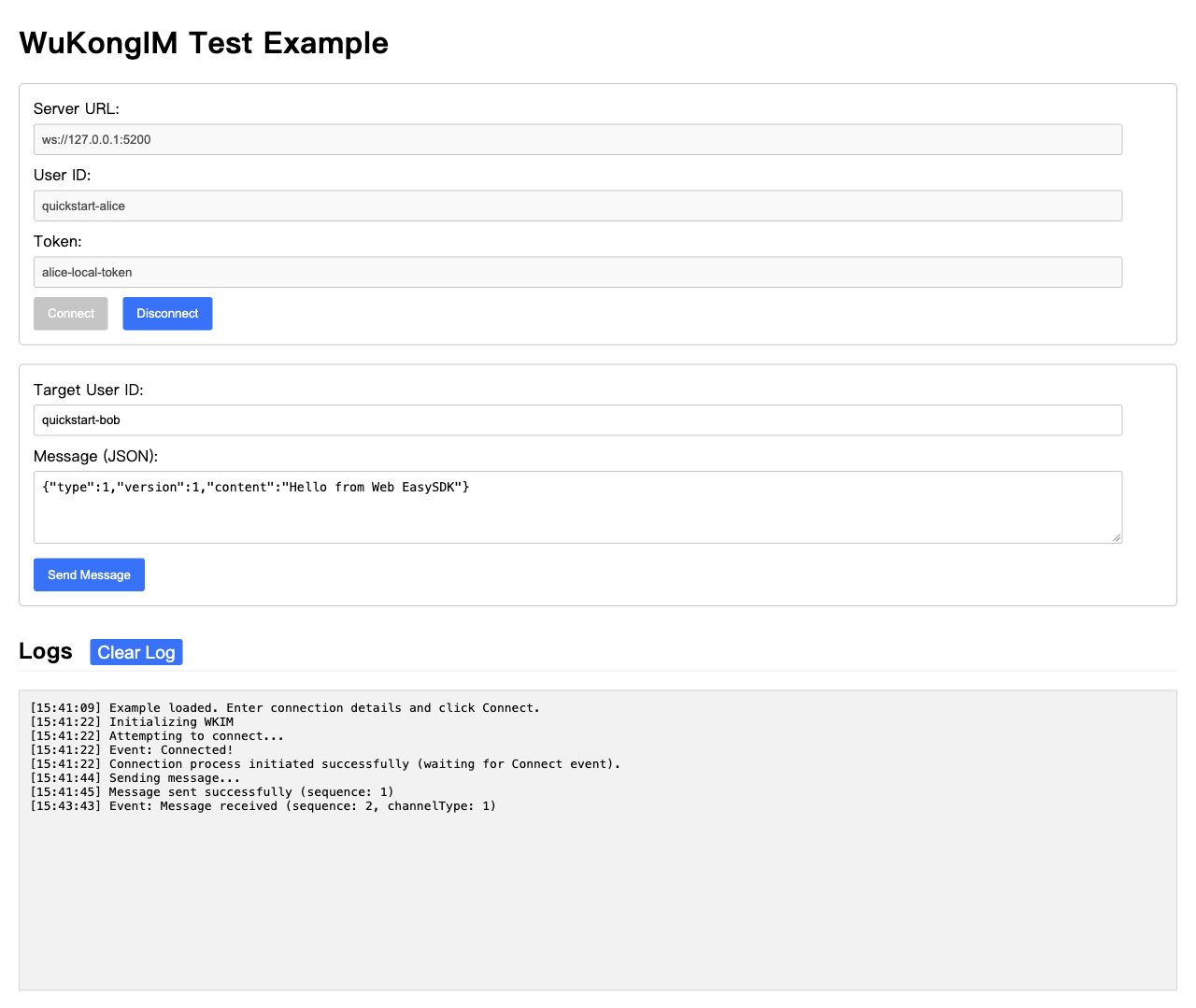
① 目标使用对方 UID。② Alice 的发送请求成功。③ Alice 收到 Bob 的回发。发送结果与对方接收需要分别核对。
发送 Promise 成功代表服务端返回了发送结果,不代表对方已读或已处理。本页只验证在线收发;离线恢复、会话和未读见 SDK 选择。
③ 页面按钮与接收区完整示例
两端都连接后再发送。Alice 目标为 bob,Bob 改为 alice;它们表示各自业务 UID,需与 BFF 返回值一致。在自己的 Message 回调中核对 fromUid、channelId、messageId 和 Payload。页面只显示最近一条消息,避免无界历史。
<button id="send-message" disabled>Send</button>
<pre id="received-message"></pre>
const output = document.querySelector<HTMLElement>('#received-message');
const button = document.querySelector<HTMLButtonElement>('#send-message');
if (!output || !button) throw new Error('Missing message UI');
button.disabled = true;
const chat = new EasyChatClient((message) => {
output.textContent = JSON.stringify({
fromUid: message.fromUid,
payload: message.payload,
});
});
window.addEventListener('pagehide', () => chat.stop(), { once: true });
try {
await chat.start(await fetchIMBootstrap());
button.disabled = false;
} catch {
chat.stop();
output.textContent = 'Connection failed';
}
button.onclick = async () => {
try {
// Bob sends to 'alice'. Click only after both clients are connected.
await chat.sendText('bob', 'Hello from Web EasySDK');
console.info('SEND completed');
} catch {
console.error('Send failed; check its outcome before retrying');
}
};5. 清理连接
退出账号、卸载应用或离开页面时调用 chat.stop():用原回调 off,再 destroy()。页面订阅者移除自己的回调,连接所有者销毁实例。
补充验证:不可达地址与刷新
用不可达地址确认 10 秒内失败并销毁,页面不会永久停在 Connecting。刷新、关闭或退出后,确认旧实例已经解绑并销毁,没有重复连接。
6. 常见问题
| 现象 | 先检查 |
|---|---|
| 缺少 WebSocket 或编码 API | 浏览器与构建环境;浏览器支持不等于小程序支持 |
| 连接被拒绝 | BFF 返回的 WSS 地址、Token 时效、证书、代理 Upgrade、Gateway 可达性 |
| 刷新后重复收消息 | 避免每次渲染都 on;卸载时 off / destroy |
| Console 出现 Token 或 Payload | 锁文件与 bundle 的实际 SDK 版本,以及应用回调、错误处理和采集器 |
日志问题用固定版本 npm 产物复现,仅保留低敏证据。SDK 默认关闭诊断,开启后也只应输出脱敏运行元数据。
下一步
继续阅读消息收发与上线检查。版本与验证记录保留历史环境和范围;当前边界见 API 版本与兼容性。
需要接入大模型?跟随 Agent 流式回复更新同一条回答,并在后端保护模型密钥。