
JavaScript / Web Quickstart
Install wukongimjssdk 1.3.5, connect a user, and exchange the first online text message.
This page has one goal: exchange a text message between two online browser sessions.
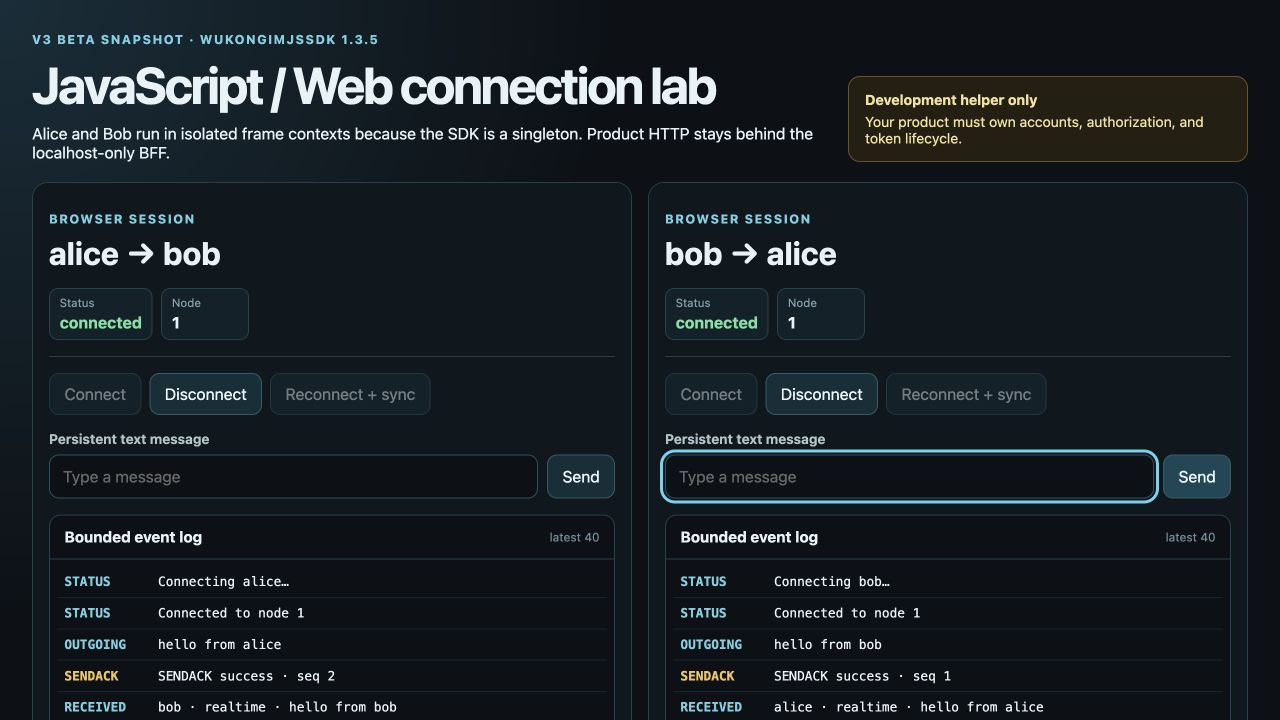
① SENDACK is the server send result. ② RECEIVED is the recipient's incoming event. Run this example first, then integrate the code into your app. Click images to enlarge them.
Run the two-user example first
Install Git, Node.js 20.11 or newer, and npm. If you do not yet have an application backend, the example includes a loopback-only Node.js service (BFF) that prepares development identities and discovers connection endpoints.
Start WuKongIM
Follow Docker Deployment or Start a Single-node Cluster.
Using a remote server? Set up SSH forwarding first
If WuKongIM runs on a remote Linux server, open another terminal on your computer and keep this SSH tunnel running:
ssh -N -L 127.0.0.1:5001:127.0.0.1:5001 -L 127.0.0.1:5200:127.0.0.1:5200 <user>@<server-ip>This path requires the test server's /route to return the browser-reachable ws://127.0.0.1:5200. For another endpoint, configure api.external_ws_addr using Networking and restart. Tunnels forward ports; they do not rewrite route responses.
Check readiness from the computer running Node.js before starting the example:
curl --fail http://127.0.0.1:5001/readyzStart the example on your computer
git clone --depth 1 https://github.com/WuKongIM/WuKongIM.git WuKongIM-web-example
cd WuKongIM-web-example/docs-site/examples/javascript-web-quickstart
npm ci
npm run dev
If you already have the repository, enter the same example directory. Open http://127.0.0.1:5173 and:
- Connect Alice and Bob; confirm both sessions are connected.
- Send from Alice, checking Alice's server send result and Bob's incoming event separately.
- Disconnect Bob and send another message from Alice.
- Reconnect Bob; confirm the missing message is restored and displayed once.
The first history sync may briefly be empty; the example retries within a finite budget.
Retry details and a different API endpoint
Person membership is projected asynchronously after a successful SENDACK, so the first history sync can briefly return HTTP 200 with an empty page. The example backend retries an empty latest page (both sequence bounds zero) up to 20 attempts, 250 ms apart. Nonempty results and ordinary cursor pages return immediately. A genuinely empty chat returns an empty list after at most 19 waits: 4.75 seconds plus HTTP request time. Other errors still fail; production integrations need their own consistency and request-deadline policy.
Node.js uses http://127.0.0.1:5001 by default. Set WK_DOCS_QUICKSTART_PRODUCT_HTTP_URL for a different test API endpoint, for example:
WK_DOCS_QUICKSTART_PRODUCT_HTTP_URL=http://127.0.0.1:15001 npm run devThe browser calls only the example's /api/development/identity and /api/messages/sync; the BFF calls WuKongIM HTTP API. In production, replace development identity provisioning with your login and authorization system. Clients do not call /user/token directly.
See the reconnect recovery result
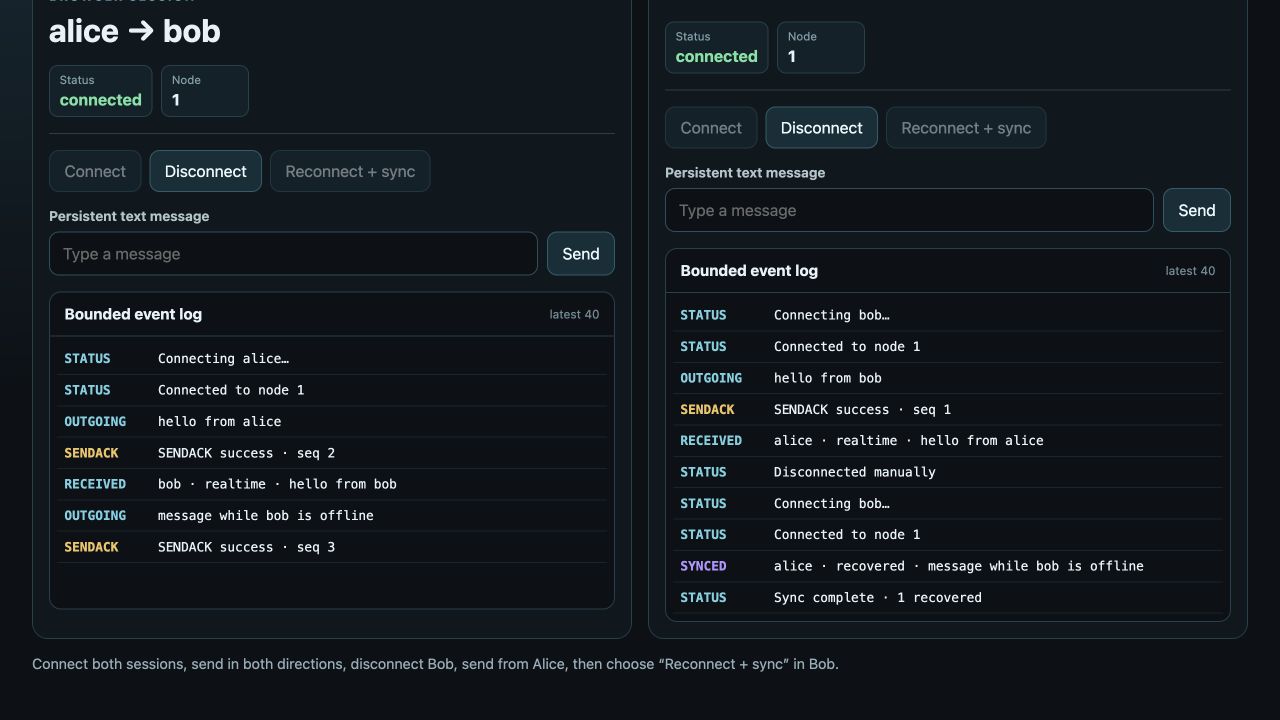
① SYNCED identifies the restored message. ② Sync complete · 1 recovered confirms recovery finished; display the same message only once.
Integrate your own frontend
The following explains installation, identity, listeners, and sending. Use two independent tabs, iframes, or browser contexts: WKSDK.shared() is a singleton, so do not sign in two users in one page context. The build tool must support npm and TypeScript.
1. Install
npm install --save-exact wukongimjssdk@1.3.5When using pnpm or Yarn, pin the same exact version and keep only the lockfile already used by the project.
2. Configure identity and endpoint
import WKSDK, {
  Channel,
  ChannelTypePerson,
  ConnectStatus,
  MessageText,
} from 'wukongimjssdk'

// Same-origin example BFF; use bob on Bob's page.
const response = await fetch('/api/development/identity', {
  method: 'POST',
  headers: { 'Content-Type': 'application/json' },
  body: JSON.stringify({ uid: 'alice' }),
})
if (!response.ok) throw new Error('identity request failed')
const bootstrap: { uid: string; token: string; websocketUrl: string } =
  await response.json()

const sdk = WKSDK.shared()
sdk.config.uid = bootstrap.uid
sdk.config.token = bootstrap.token
sdk.config.addr = bootstrap.websocketUrl
sdk.config.deviceFlag = 1 // Web
sdk.config.debug = false
bootstrap is a backend response, not an SDK type. The runnable example provides this URL; in your own project, replace it with your authenticated application login endpoint returning these three fields. Use a correctly certified wss:// endpoint in production.
3. Register listeners first
Show complete listeners: connection, incoming messages, and send results
const onConnect = (status: ConnectStatus, reasonCode?: number) => {
  if (status === ConnectStatus.Connected) {
    console.log('WuKongIM connected')
  } else if (status === ConnectStatus.ConnectFail) {
    console.error('connect failed', reasonCode)
  } else if (status === ConnectStatus.ConnectKick) {
    console.error('this account was signed in elsewhere', reasonCode)
  }
}

const onMessage = (message: any) => {
  if (message.send) return // Sending locally also emits a message event.
  if (message.content instanceof MessageText) {
    console.log(`${message.fromUID}: ${message.content.text}`)
  }
}

const onMessageStatus = (ack: any) => {
  if (ack.reasonCode === 1) {
    console.log('message sent', ack.clientSeq, ack.messageSeq)
  } else {
    console.error('message failed', ack.clientSeq, ack.reasonCode)
  }
}

sdk.connectManager.addConnectStatusListener(onConnect)
sdk.chatManager.addMessageListener(onMessage)
sdk.chatManager.addMessageStatusListener(onMessageStatus)
Keep the function references so the page can remove the same listeners during cleanup.
4. Connect and send
sdk.connect()After ConnectStatus.Connected, send from Alice to Bob:
const message = await sdk.chatManager.send(
  new MessageText('Hello, Bob'),
  new Channel('bob', ChannelTypePerson),
)

console.log('local message', message.clientMsgNo)
The returned Promise gives you the local message. The server result comes through onMessageStatus, while Bob's live message comes through onMessage; they are separate events.
Expected result
- Alice and Bob both report
ConnectStatus.Connected. - Alice receives a send state with
reasonCode === 1. - Bob prints “Hello, Bob”.
Clean up the page
sdk.connectManager.removeConnectStatusListener(onConnect)
sdk.chatManager.removeMessageListener(onMessage)
sdk.chatManager.removeMessageStatusListener(onMessageStatus)
sdk.disconnect()
If connection fails, verify that the endpoint is a WebSocket address rather than an HTTP API address, then check page CSP, reverse proxy, and certificate configuration. Continue with Connection and Messages.
Troubleshoot by symptom
| Symptom | Check and action |
|---|---|
npm ci or build fails | Check the Node.js version and example directory; keep the repository lockfile |
| Development identity request fails | Check /readyz, the API endpoint, and port 5001 forwarding from the Node.js computer |
| Identity succeeds but WebSocket fails | Check the browser can reach the /route endpoint result, port 5200 forwarding, certificates, and proxy paths |
| Connected but Bob sees no message | Check the peer UID, server send result, and SDK text payload format |
| Reconnect does not restore messages | Inspect /api/messages/sync, confirm durable messages exist, and keep the same test UID |