
Send the First Message
Follow the screenshots to connect Alice and Bob and verify your first two-way message exchange.
Complete the /readyz check in Docker Deployment, or launch all four Demos from source. This is Bob's view in the current Chat Demo: Alice's message on the left, Bob's reply on the right. Click any image to enlarge it.
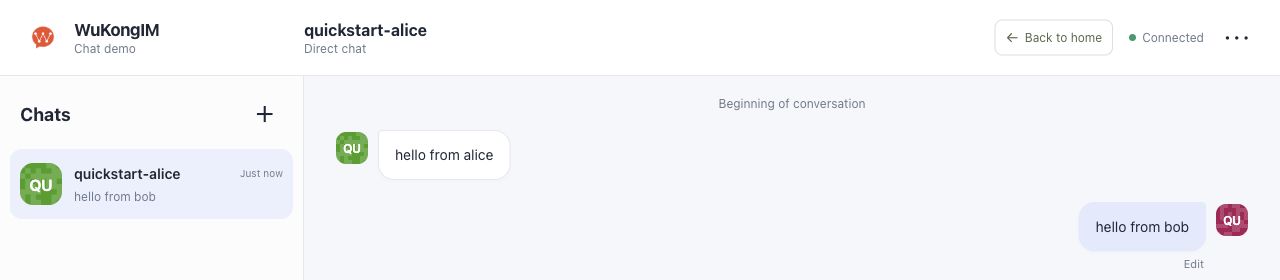
① Received: hello from alice. ② Reply: hello from bob; Alice should receive it too.
1. Sign in as Alice
With Docker, open Chat Demo. With the source launcher, choose Chat from the opened catalog. Enter this test identity:
| Field | Value |
|---|---|
| API base URL | Keep the automatic address; Docker defaults to http://127.0.0.1:5001 |
| Account | quickstart-alice |
| Token | alice-local-token |
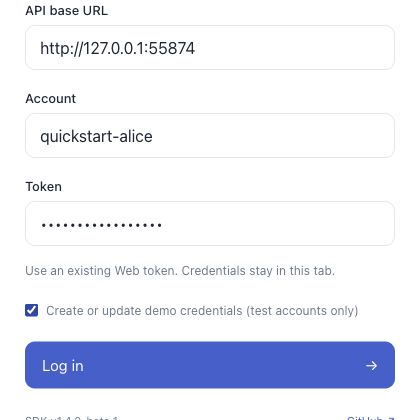
① Keep the local API URL. ② Enter the UID and token. ③ Select the demo-credentials checkbox for this new test account, then choose Log in.
Create credentials only for dedicated test accounts
The checkbox writes this UID's Web token. For existing accounts or migration acceptance, leave it off and enter the existing Web token. The default sign-in mode does not modify credentials.
2. Sign in as Bob and choose direct chat
Open the Demo in another browser profile, private window, or browser. Use quickstart-bob / bob-local-token, selecting demo credential creation only for this new test account.
Wait until both headers show Connected. In Alice's page, click + above the chat list (or Start a chat), choose Direct chat, enter quickstart-bob, and click OK.
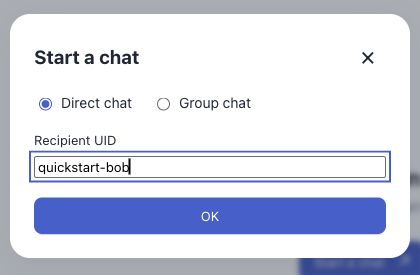
① Select Direct chat. ② Enter the other user's UID. ③ Click OK.
Does your released Docker UI look different?
These screenshots show the current local main Chat Demo. Earlier images may show Chinese labels: connection success (连接成功) and a top-right conversation selector (与谁会话?). Open that selector, choose direct chat (单聊), and enter the recipient UID. Test identities and messaging checks are the same. Use the source launcher to try the four current Demos.
3. Exchange messages
- Alice sends
hello from alice. Wait for the sending indicator to clear; in Bob's page, open a direct chat withquickstart-aliceand confirm the same text appears. - Bob replies with
hello from bob. Confirm Alice receives it.
Success checklist
- Both UIDs are connected.
- Alice's send succeeds and Bob sees the original text.
- Bob's reply also appears on Alice's page.
Troubleshoot by symptom
| Symptom | Check first |
|---|---|
| Disconnected | /readyz, WebSocket port 5200, and docker logs --tail 100 wukongim |
| Recipient sees no message | Both peers online, exact recipient UID, and direct-chat selection |
| Sessions replace each other | Different UIDs and independent browser sessions |
For Linux packages, check logs with sudo journalctl -u wukongim -n 100 --no-pager.
What does this verify?
The path covers demo token registration, exact-match CONNECT token checks, route discovery, WebSocket connection, channel message commit, and online delivery. Send success and recipient delivery are separate results; check both.
It verifies the development path. Production still needs account authentication, token expiry and replay policy, TLS, capacity, recovery, and durability validation. See Chat Demo boundaries.