> ## Documentation Index
> Fetch the complete documentation index at: https://wukong.mintlify.site/llms.txt
> Use this file to discover all available pages before exploring further.
# Webhook 回调
> WuKongIM 通过 Webhook 向第三方应用推送用户在线状态、离线消息和所有消息等数据
# Webhook 回调
## 概述
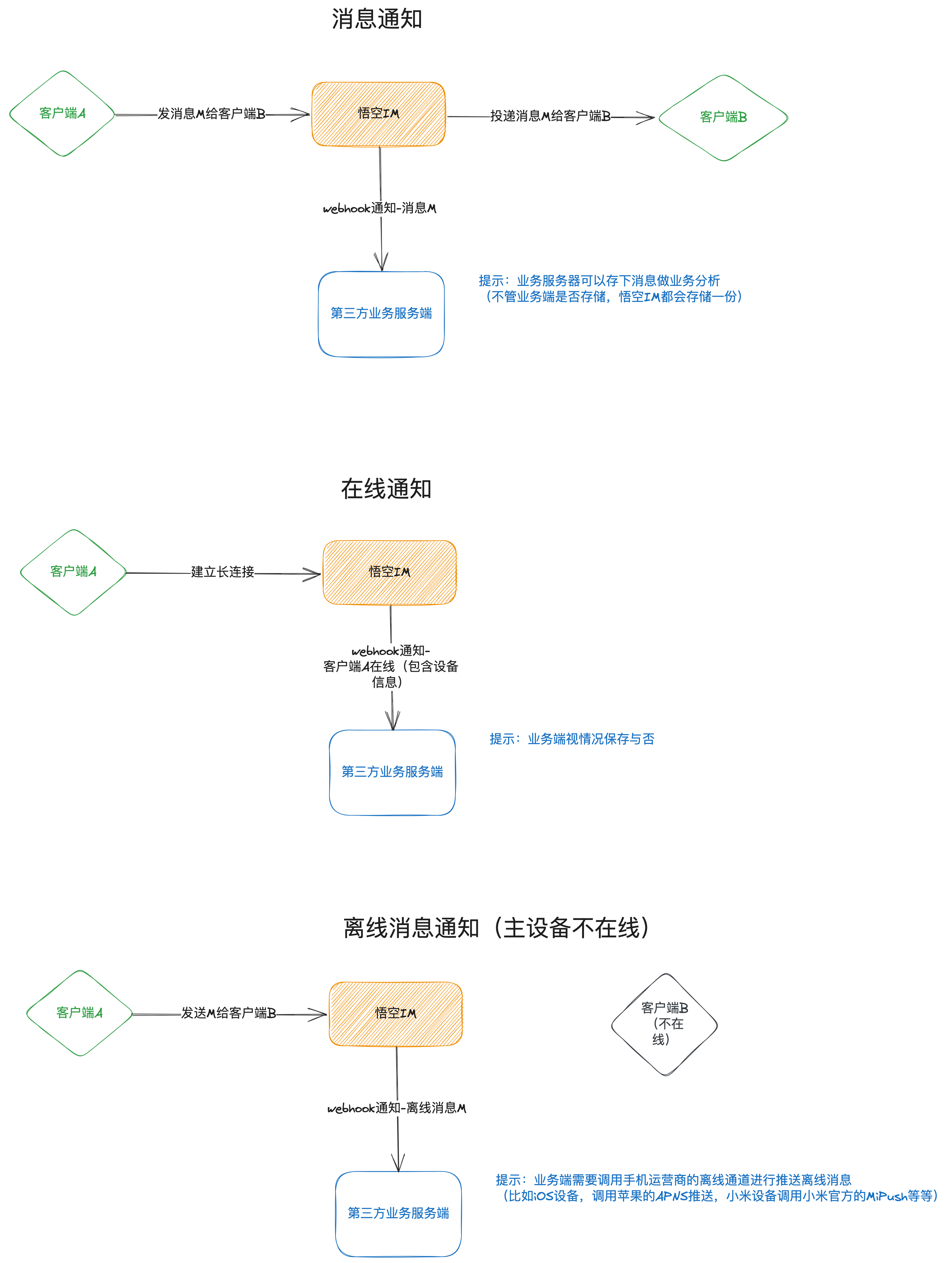
WuKongIM 的一些数据将通过 webhook 的形式回调给第三方应用服务,比如用户在线状态,需要推送的消息,所有消息等等。所有 webhook 都是 **POST 请求**,事件名通过 query 参数传入。
例如,第三方的服务器提供的 webhook 地址为 `http://example.com/webhook`,那么在线状态的 webhook 为:
```
http://example.com/webhook?event=user.onlinestatus
```
请求体的数据类似为:
```json theme={null}
["uid1-0-1", "uid2-1-0"]
```
## Webhook 工作流程
 ## 事件类型
### 1. 用户在线状态通知
每个用户的上线和下线都会通过此 webhook 通知给第三方服务器。
**事件名**:`user.onlinestatus`
**请求方式**:`POST`
**请求 URL**:`{webhook_url}?event=user.onlinestatus`
#### 请求体
请求体是一个字符串数组,每个元素格式为:
```
用户UID-设备标识-在线状态-连接ID-设备标识对应的设备在线数量-用户总个设备在线数量
```
**示例数据**:
```json theme={null}
["uid1-1-0-1001-2-4", "uid2-0-0-1001-1-2"]
```
#### 数据字段说明
| 位置 | 字段名 | 类型 | 说明 |
| -- | ------- | ------- | ---------------- |
| 1 | 用户UID | string | 用户唯一标识符 |
| 2 | 设备标识 | integer | 0=APP, 1=Web端 |
| 3 | 在线状态 | integer | 0=离线, 1=在线 |
| 4 | 连接ID | integer | 当前设备在服务器的建立连接的ID |
| 5 | 设备在线数量 | integer | 同一用户同一设备类型的在线数量 |
| 6 | 用户总在线数量 | integer | 用户所有设备的在线数量 |
```bash cURL theme={null}
# 模拟 WuKongIM 发送的 webhook 请求
curl -X POST "http://your-server.com/webhook?event=user.onlinestatus" \
-H "Content-Type: application/json" \
-d '["user123-1-1-1001-1-1", "user456-0-0-1002-0-0"]'
```
```javascript JavaScript theme={null}
// 接收 webhook 的服务器端代码示例
app.post('/webhook', (req, res) => {
const event = req.query.event;
if (event === 'user.onlinestatus') {
const statusData = req.body; // 数组格式
statusData.forEach(status => {
const [uid, deviceFlag, online, connId, deviceCount, totalCount] = status.split('-');
console.log({
uid,
deviceFlag: parseInt(deviceFlag),
online: parseInt(online),
connId: parseInt(connId),
deviceCount: parseInt(deviceCount),
totalCount: parseInt(totalCount)
});
// 处理用户在线状态变化
handleUserOnlineStatus(uid, online === '1');
});
}
res.status(200).send('OK');
});
```
```python Python theme={null}
from flask import Flask, request, jsonify
app = Flask(__name__)
@app.route('/webhook', methods=['POST'])
def webhook():
event = request.args.get('event')
if event == 'user.onlinestatus':
status_data = request.json # 数组格式
for status in status_data:
parts = status.split('-')
uid = parts[0]
device_flag = int(parts[1])
online = int(parts[2])
conn_id = int(parts[3])
device_count = int(parts[4])
total_count = int(parts[5])
# 处理用户在线状态变化
handle_user_online_status(uid, online == 1)
return 'OK', 200
```
```go Go theme={null}
package main
import (
"encoding/json"
"net/http"
"strconv"
"strings"
)
func webhookHandler(w http.ResponseWriter, r *http.Request) {
event := r.URL.Query().Get("event")
if event == "user.onlinestatus" {
var statusData []string
json.NewDecoder(r.Body).Decode(&statusData)
for _, status := range statusData {
parts := strings.Split(status, "-")
if len(parts) >= 6 {
uid := parts[0]
deviceFlag, _ := strconv.Atoi(parts[1])
online, _ := strconv.Atoi(parts[2])
connId, _ := strconv.Atoi(parts[3])
deviceCount, _ := strconv.Atoi(parts[4])
totalCount, _ := strconv.Atoi(parts[5])
// 处理用户在线状态变化
handleUserOnlineStatus(uid, online == 1)
}
}
}
w.WriteHeader(http.StatusOK)
w.Write([]byte("OK"))
}
```
### 2. 离线消息通知
离线消息通知主要是将需要通过离线推送的消息通知给第三方服务器,第三方服务器收到此 webhook 后需要将此消息内容调用手机厂商推送接口,将消息推给 ToUIDs 列表的用户。
**事件名**:`msg.offline`
**请求方式**:`POST`
**请求 URL**:`{webhook_url}?event=msg.offline`
#### 请求体
请求体是一个 MessageResp 消息对象:
消息头部信息
消息设置标识
服务端的消息ID(全局唯一)
字符串类型服务端的消息ID(全局唯一)
客户端消息唯一编号
消息序列号(频道唯一,有序递增)
发送者UID
频道ID
频道类型
服务器消息时间戳(10位,到秒)
Base64编码的消息内容
接收用户列表
接收用户UID
```javascript JavaScript theme={null}
// 接收离线消息 webhook
app.post('/webhook', (req, res) => {
const event = req.query.event;
if (event === 'msg.offline') {
const message = req.body;
// 解码消息内容
const payload = JSON.parse(atob(message.payload));
// 发送推送通知给 to_uids 中的用户
message.to_uids.forEach(uid => {
sendPushNotification(uid, {
title: `来自 ${message.from_uid} 的消息`,
body: payload.content,
messageId: message.message_idstr
});
});
}
res.status(200).send('OK');
});
```
```python Python theme={null}
import base64
import json
@app.route('/webhook', methods=['POST'])
def webhook():
event = request.args.get('event')
if event == 'msg.offline':
message = request.json
# 解码消息内容
payload = json.loads(base64.b64decode(message['payload']).decode('utf-8'))
# 发送推送通知给 to_uids 中的用户
for uid in message['to_uids']:
send_push_notification(uid, {
'title': f"来自 {message['from_uid']} 的消息",
'body': payload['content'],
'message_id': message['message_idstr']
})
return 'OK', 200
```
### 3. 所有消息通知
WuKongIM 服务端会将所有消息推送给第三方服务器。为了降低第三方服务器的压力,并不是一条一条推送,做了延迟处理,默认是 500 毫秒(`webhook.msgNotifyEventPushInterval`)批量推送一次,这个可自己视情况配置。
**事件名**:`msg.notify`
**请求方式**:`POST`
**请求 URL**:`{webhook_url}?event=msg.notify`
#### 请求体
请求体是一个 MessageResp 消息对象数组,每个消息对象包含以下字段:
消息头部信息
消息设置标识
服务端的消息ID(全局唯一)
字符串类型服务端的消息ID(全局唯一)
客户端消息唯一编号
消息序列号(频道唯一,有序递增)
发送者UID
频道ID
频道类型
服务器消息时间戳(10位,到秒)
Base64编码的消息内容
```javascript JavaScript theme={null}
// 接收所有消息 webhook
app.post('/webhook', (req, res) => {
const event = req.query.event;
if (event === 'msg.notify') {
const messages = req.body; // 消息数组
messages.forEach(message => {
// 解码消息内容
const payload = JSON.parse(atob(message.payload));
// 保存消息到数据库或搜索引擎
saveMessageToDatabase({
messageId: message.message_idstr,
fromUid: message.from_uid,
channelId: message.channel_id,
channelType: message.channel_type,
content: payload,
timestamp: message.timestamp
});
});
}
res.status(200).send('OK');
});
```
```python Python theme={null}
@app.route('/webhook', methods=['POST'])
def webhook():
event = request.args.get('event')
if event == 'msg.notify':
messages = request.json # 消息数组
for message in messages:
# 解码消息内容
payload = json.loads(base64.b64decode(message['payload']).decode('utf-8'))
# 保存消息到数据库或搜索引擎
save_message_to_database({
'message_id': message['message_idstr'],
'from_uid': message['from_uid'],
'channel_id': message['channel_id'],
'channel_type': message['channel_type'],
'content': payload,
'timestamp': message['timestamp']
})
return 'OK', 200
```
## 配置 Webhook
在 WuKongIM 配置文件中设置 webhook URL:
```yaml theme={null}
webhook:
url: "http://your-server.com/webhook"
timeout: 5s
msgNotifyEventPushInterval: 500ms
```
## 最佳实践
1. **响应速度**:webhook 处理应该尽可能快,避免阻塞 WuKongIM 服务
2. **幂等性**:确保 webhook 处理是幂等的,可以安全地重试
3. **错误处理**:返回适当的 HTTP 状态码,2xx 表示成功
4. **异步处理**:对于复杂的业务逻辑,建议异步处理
5. **监控告警**:监控 webhook 的成功率和响应时间
6. **安全验证**:验证请求来源,防止恶意请求
## 故障排除
### 常见问题
1. **Webhook 未收到**:检查 URL 配置和网络连通性
2. **处理超时**:优化处理逻辑,减少响应时间
3. **重复处理**:实现幂等性处理机制
4. **消息丢失**:确保返回正确的 HTTP 状态码
## 事件类型
### 1. 用户在线状态通知
每个用户的上线和下线都会通过此 webhook 通知给第三方服务器。
**事件名**:`user.onlinestatus`
**请求方式**:`POST`
**请求 URL**:`{webhook_url}?event=user.onlinestatus`
#### 请求体
请求体是一个字符串数组,每个元素格式为:
```
用户UID-设备标识-在线状态-连接ID-设备标识对应的设备在线数量-用户总个设备在线数量
```
**示例数据**:
```json theme={null}
["uid1-1-0-1001-2-4", "uid2-0-0-1001-1-2"]
```
#### 数据字段说明
| 位置 | 字段名 | 类型 | 说明 |
| -- | ------- | ------- | ---------------- |
| 1 | 用户UID | string | 用户唯一标识符 |
| 2 | 设备标识 | integer | 0=APP, 1=Web端 |
| 3 | 在线状态 | integer | 0=离线, 1=在线 |
| 4 | 连接ID | integer | 当前设备在服务器的建立连接的ID |
| 5 | 设备在线数量 | integer | 同一用户同一设备类型的在线数量 |
| 6 | 用户总在线数量 | integer | 用户所有设备的在线数量 |
```bash cURL theme={null}
# 模拟 WuKongIM 发送的 webhook 请求
curl -X POST "http://your-server.com/webhook?event=user.onlinestatus" \
-H "Content-Type: application/json" \
-d '["user123-1-1-1001-1-1", "user456-0-0-1002-0-0"]'
```
```javascript JavaScript theme={null}
// 接收 webhook 的服务器端代码示例
app.post('/webhook', (req, res) => {
const event = req.query.event;
if (event === 'user.onlinestatus') {
const statusData = req.body; // 数组格式
statusData.forEach(status => {
const [uid, deviceFlag, online, connId, deviceCount, totalCount] = status.split('-');
console.log({
uid,
deviceFlag: parseInt(deviceFlag),
online: parseInt(online),
connId: parseInt(connId),
deviceCount: parseInt(deviceCount),
totalCount: parseInt(totalCount)
});
// 处理用户在线状态变化
handleUserOnlineStatus(uid, online === '1');
});
}
res.status(200).send('OK');
});
```
```python Python theme={null}
from flask import Flask, request, jsonify
app = Flask(__name__)
@app.route('/webhook', methods=['POST'])
def webhook():
event = request.args.get('event')
if event == 'user.onlinestatus':
status_data = request.json # 数组格式
for status in status_data:
parts = status.split('-')
uid = parts[0]
device_flag = int(parts[1])
online = int(parts[2])
conn_id = int(parts[3])
device_count = int(parts[4])
total_count = int(parts[5])
# 处理用户在线状态变化
handle_user_online_status(uid, online == 1)
return 'OK', 200
```
```go Go theme={null}
package main
import (
"encoding/json"
"net/http"
"strconv"
"strings"
)
func webhookHandler(w http.ResponseWriter, r *http.Request) {
event := r.URL.Query().Get("event")
if event == "user.onlinestatus" {
var statusData []string
json.NewDecoder(r.Body).Decode(&statusData)
for _, status := range statusData {
parts := strings.Split(status, "-")
if len(parts) >= 6 {
uid := parts[0]
deviceFlag, _ := strconv.Atoi(parts[1])
online, _ := strconv.Atoi(parts[2])
connId, _ := strconv.Atoi(parts[3])
deviceCount, _ := strconv.Atoi(parts[4])
totalCount, _ := strconv.Atoi(parts[5])
// 处理用户在线状态变化
handleUserOnlineStatus(uid, online == 1)
}
}
}
w.WriteHeader(http.StatusOK)
w.Write([]byte("OK"))
}
```
### 2. 离线消息通知
离线消息通知主要是将需要通过离线推送的消息通知给第三方服务器,第三方服务器收到此 webhook 后需要将此消息内容调用手机厂商推送接口,将消息推给 ToUIDs 列表的用户。
**事件名**:`msg.offline`
**请求方式**:`POST`
**请求 URL**:`{webhook_url}?event=msg.offline`
#### 请求体
请求体是一个 MessageResp 消息对象:
消息头部信息
消息设置标识
服务端的消息ID(全局唯一)
字符串类型服务端的消息ID(全局唯一)
客户端消息唯一编号
消息序列号(频道唯一,有序递增)
发送者UID
频道ID
频道类型
服务器消息时间戳(10位,到秒)
Base64编码的消息内容
接收用户列表
接收用户UID
```javascript JavaScript theme={null}
// 接收离线消息 webhook
app.post('/webhook', (req, res) => {
const event = req.query.event;
if (event === 'msg.offline') {
const message = req.body;
// 解码消息内容
const payload = JSON.parse(atob(message.payload));
// 发送推送通知给 to_uids 中的用户
message.to_uids.forEach(uid => {
sendPushNotification(uid, {
title: `来自 ${message.from_uid} 的消息`,
body: payload.content,
messageId: message.message_idstr
});
});
}
res.status(200).send('OK');
});
```
```python Python theme={null}
import base64
import json
@app.route('/webhook', methods=['POST'])
def webhook():
event = request.args.get('event')
if event == 'msg.offline':
message = request.json
# 解码消息内容
payload = json.loads(base64.b64decode(message['payload']).decode('utf-8'))
# 发送推送通知给 to_uids 中的用户
for uid in message['to_uids']:
send_push_notification(uid, {
'title': f"来自 {message['from_uid']} 的消息",
'body': payload['content'],
'message_id': message['message_idstr']
})
return 'OK', 200
```
### 3. 所有消息通知
WuKongIM 服务端会将所有消息推送给第三方服务器。为了降低第三方服务器的压力,并不是一条一条推送,做了延迟处理,默认是 500 毫秒(`webhook.msgNotifyEventPushInterval`)批量推送一次,这个可自己视情况配置。
**事件名**:`msg.notify`
**请求方式**:`POST`
**请求 URL**:`{webhook_url}?event=msg.notify`
#### 请求体
请求体是一个 MessageResp 消息对象数组,每个消息对象包含以下字段:
消息头部信息
消息设置标识
服务端的消息ID(全局唯一)
字符串类型服务端的消息ID(全局唯一)
客户端消息唯一编号
消息序列号(频道唯一,有序递增)
发送者UID
频道ID
频道类型
服务器消息时间戳(10位,到秒)
Base64编码的消息内容
```javascript JavaScript theme={null}
// 接收所有消息 webhook
app.post('/webhook', (req, res) => {
const event = req.query.event;
if (event === 'msg.notify') {
const messages = req.body; // 消息数组
messages.forEach(message => {
// 解码消息内容
const payload = JSON.parse(atob(message.payload));
// 保存消息到数据库或搜索引擎
saveMessageToDatabase({
messageId: message.message_idstr,
fromUid: message.from_uid,
channelId: message.channel_id,
channelType: message.channel_type,
content: payload,
timestamp: message.timestamp
});
});
}
res.status(200).send('OK');
});
```
```python Python theme={null}
@app.route('/webhook', methods=['POST'])
def webhook():
event = request.args.get('event')
if event == 'msg.notify':
messages = request.json # 消息数组
for message in messages:
# 解码消息内容
payload = json.loads(base64.b64decode(message['payload']).decode('utf-8'))
# 保存消息到数据库或搜索引擎
save_message_to_database({
'message_id': message['message_idstr'],
'from_uid': message['from_uid'],
'channel_id': message['channel_id'],
'channel_type': message['channel_type'],
'content': payload,
'timestamp': message['timestamp']
})
return 'OK', 200
```
## 配置 Webhook
在 WuKongIM 配置文件中设置 webhook URL:
```yaml theme={null}
webhook:
url: "http://your-server.com/webhook"
timeout: 5s
msgNotifyEventPushInterval: 500ms
```
## 最佳实践
1. **响应速度**:webhook 处理应该尽可能快,避免阻塞 WuKongIM 服务
2. **幂等性**:确保 webhook 处理是幂等的,可以安全地重试
3. **错误处理**:返回适当的 HTTP 状态码,2xx 表示成功
4. **异步处理**:对于复杂的业务逻辑,建议异步处理
5. **监控告警**:监控 webhook 的成功率和响应时间
6. **安全验证**:验证请求来源,防止恶意请求
## 故障排除
### 常见问题
1. **Webhook 未收到**:检查 URL 配置和网络连通性
2. **处理超时**:优化处理逻辑,减少响应时间
3. **重复处理**:实现幂等性处理机制
4. **消息丢失**:确保返回正确的 HTTP 状态码