> ## Documentation Index
> Fetch the complete documentation index at: https://wukong.mintlify.site/llms.txt
> Use this file to discover all available pages before exploring further.
# Webhook Callbacks
> WuKongIM pushes user online status, offline messages and all messages to third-party applications through webhooks
# Webhook Callbacks
## Overview
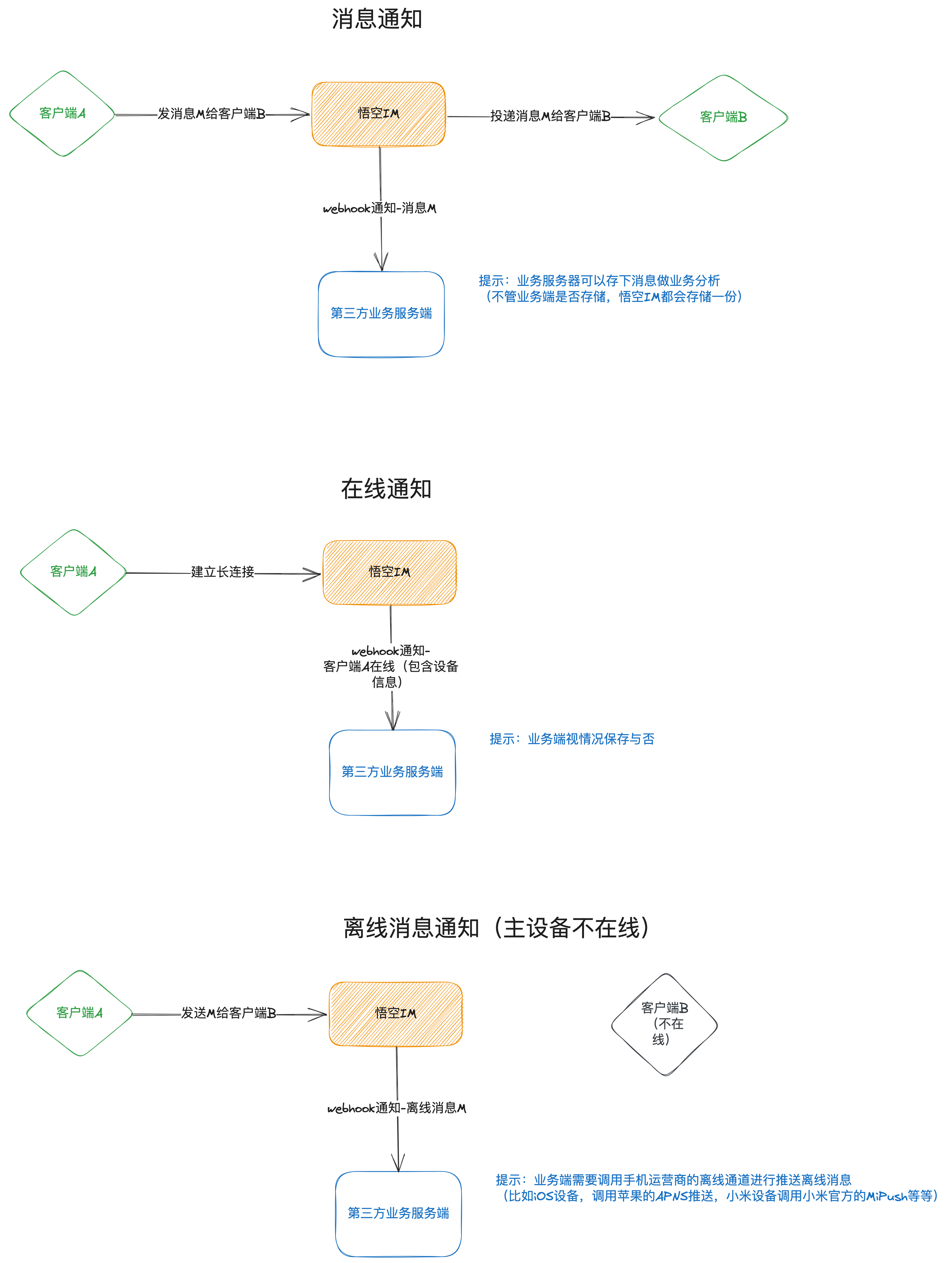
Some data from WuKongIM will be sent to third-party application services through webhooks, such as user online status, messages that need to be pushed, all messages, etc. All webhooks are **POST requests**, and the event name is passed through query parameters.
For example, if the third-party server provides a webhook address of `http://example.com/webhook`, then the online status webhook would be:
```
http://example.com/webhook?event=user.onlinestatus
```
The request body data would be similar to:
```json theme={null}
["uid1-0-1", "uid2-1-0"]
```
## Webhook Workflow
 ## Event Types
### 1. User Online Status Notification
Each user's online and offline status will be notified to the third-party server through this webhook.
**Event Name**: `user.onlinestatus`
**Request Method**: `POST`
**Request URL**: `{webhook_url}?event=user.onlinestatus`
#### Request Body
The request body is a string array, each element formatted as:
```
UserUID-DeviceFlag-OnlineStatus-ConnectionID-DeviceOnlineCount-UserTotalOnlineCount
```
**Example Data**:
```json theme={null}
["uid1-1-0-1001-2-4", "uid2-0-0-1001-1-2"]
```
#### Data Field Description
| Position | Field Name | Type | Description |
| -------- | ----------------------- | ------- | ----------------------------------------------------- |
| 1 | User UID | string | User unique identifier |
| 2 | Device Flag | integer | 0=APP, 1=Web |
| 3 | Online Status | integer | 0=Offline, 1=Online |
| 4 | Connection ID | integer | Connection ID established by current device on server |
| 5 | Device Online Count | integer | Online count for same user and same device type |
| 6 | User Total Online Count | integer | Total online count for all user devices |
```bash cURL theme={null}
# Simulate webhook request sent by WuKongIM
curl -X POST "http://your-server.com/webhook?event=user.onlinestatus" \
-H "Content-Type: application/json" \
-d '["user123-1-1-1001-1-1", "user456-0-0-1002-0-0"]'
```
```javascript JavaScript theme={null}
// Server-side code example for receiving webhook
app.post('/webhook', (req, res) => {
const event = req.query.event;
if (event === 'user.onlinestatus') {
const statusData = req.body; // Array format
statusData.forEach(status => {
const [uid, deviceFlag, online, connId, deviceCount, totalCount] = status.split('-');
console.log({
uid,
deviceFlag: parseInt(deviceFlag),
online: parseInt(online),
connId: parseInt(connId),
deviceCount: parseInt(deviceCount),
totalCount: parseInt(totalCount)
});
// Handle user online status change
handleUserOnlineStatus(uid, online === '1');
});
}
res.status(200).send('OK');
});
```
```python Python theme={null}
from flask import Flask, request, jsonify
app = Flask(__name__)
@app.route('/webhook', methods=['POST'])
def webhook():
event = request.args.get('event')
if event == 'user.onlinestatus':
status_data = request.json # Array format
for status in status_data:
parts = status.split('-')
uid = parts[0]
device_flag = int(parts[1])
online = int(parts[2])
conn_id = int(parts[3])
device_count = int(parts[4])
total_count = int(parts[5])
# Handle user online status change
handle_user_online_status(uid, online == 1)
return 'OK', 200
```
```go Go theme={null}
package main
import (
"encoding/json"
"net/http"
"strconv"
"strings"
)
func webhookHandler(w http.ResponseWriter, r *http.Request) {
event := r.URL.Query().Get("event")
if event == "user.onlinestatus" {
var statusData []string
json.NewDecoder(r.Body).Decode(&statusData)
for _, status := range statusData {
parts := strings.Split(status, "-")
if len(parts) >= 6 {
uid := parts[0]
deviceFlag, _ := strconv.Atoi(parts[1])
online, _ := strconv.Atoi(parts[2])
connId, _ := strconv.Atoi(parts[3])
deviceCount, _ := strconv.Atoi(parts[4])
totalCount, _ := strconv.Atoi(parts[5])
// Handle user online status change
handleUserOnlineStatus(uid, online == 1)
}
}
}
w.WriteHeader(http.StatusOK)
w.Write([]byte("OK"))
}
```
### 2. Offline Message Notification
Offline message notification mainly notifies the third-party server of messages that need to be pushed offline. After receiving this webhook, the third-party server needs to call mobile vendor push interfaces to push the message content to users in the ToUIDs list.
**Event Name**: `msg.offline`
**Request Method**: `POST`
**Request URL**: `{webhook_url}?event=msg.offline`
#### Request Body
The request body is a MessageResp message object:
Message header information
Message setting identifier
Server message ID (globally unique)
String type server message ID (globally unique)
Client message unique number
Message sequence number (channel unique, ordered increment)
Sender UID
Channel ID
Channel type
Server message timestamp (10 digits, to seconds)
Base64 encoded message content
Recipient user list
Recipient user UID
```javascript JavaScript theme={null}
// Receive offline message webhook
app.post('/webhook', (req, res) => {
const event = req.query.event;
if (event === 'msg.offline') {
const message = req.body;
// Decode message content
const payload = JSON.parse(atob(message.payload));
// Send push notification to users in to_uids
message.to_uids.forEach(uid => {
sendPushNotification(uid, {
title: `Message from ${message.from_uid}`,
body: payload.content,
messageId: message.message_idstr
});
});
}
res.status(200).send('OK');
});
```
```python Python theme={null}
import base64
import json
@app.route('/webhook', methods=['POST'])
def webhook():
event = request.args.get('event')
if event == 'msg.offline':
message = request.json
# Decode message content
payload = json.loads(base64.b64decode(message['payload']).decode('utf-8'))
# Send push notification to users in to_uids
for uid in message['to_uids']:
send_push_notification(uid, {
'title': f"Message from {message['from_uid']}",
'body': payload['content'],
'message_id': message['message_idstr']
})
return 'OK', 200
```
### 3. All Messages Notification
WuKongIM server will push all messages to the third-party server. To reduce pressure on the third-party server, messages are not pushed one by one but with delay processing. By default, batch push occurs every 500 milliseconds (`webhook.msgNotifyEventPushInterval`), which can be configured as needed.
**Event Name**: `msg.notify`
**Request Method**: `POST`
**Request URL**: `{webhook_url}?event=msg.notify`
#### Request Body
The request body is an array of MessageResp message objects, each containing the following fields:
Message header information
Message setting identifier
Server message ID (globally unique)
String type server message ID (globally unique)
Client message unique number
Message sequence number (channel unique, ordered increment)
Sender UID
Channel ID
Channel type
Server message timestamp (10 digits, to seconds)
Base64 encoded message content
```javascript JavaScript theme={null}
// Receive all messages webhook
app.post('/webhook', (req, res) => {
const event = req.query.event;
if (event === 'msg.notify') {
const messages = req.body; // Message array
messages.forEach(message => {
// Decode message content
const payload = JSON.parse(atob(message.payload));
// Save message to database or search engine
saveMessageToDatabase({
messageId: message.message_idstr,
fromUid: message.from_uid,
channelId: message.channel_id,
channelType: message.channel_type,
content: payload,
timestamp: message.timestamp
});
});
}
res.status(200).send('OK');
});
```
```python Python theme={null}
@app.route('/webhook', methods=['POST'])
def webhook():
event = request.args.get('event')
if event == 'msg.notify':
messages = request.json # Message array
for message in messages:
# Decode message content
payload = json.loads(base64.b64decode(message['payload']).decode('utf-8'))
# Save message to database or search engine
save_message_to_database({
'message_id': message['message_idstr'],
'from_uid': message['from_uid'],
'channel_id': message['channel_id'],
'channel_type': message['channel_type'],
'content': payload,
'timestamp': message['timestamp']
})
return 'OK', 200
```
## Configure Webhook
Set the webhook URL in the WuKongIM configuration file:
```yaml theme={null}
webhook:
url: "http://your-server.com/webhook"
timeout: 5s
msgNotifyEventPushInterval: 500ms
```
## Best Practices
1. **Response Speed**: Webhook processing should be as fast as possible to avoid blocking WuKongIM service
2. **Idempotency**: Ensure webhook processing is idempotent and can be safely retried
3. **Error Handling**: Return appropriate HTTP status codes, 2xx indicates success
4. **Async Processing**: For complex business logic, recommend asynchronous processing
5. **Monitoring & Alerting**: Monitor webhook success rate and response time
6. **Security Verification**: Verify request source to prevent malicious requests
## Troubleshooting
### Common Issues
1. **Webhook Not Received**: Check URL configuration and network connectivity
2. **Processing Timeout**: Optimize processing logic to reduce response time
3. **Duplicate Processing**: Implement idempotent processing mechanism
4. **Message Loss**: Ensure correct HTTP status codes are returned
## Event Types
### 1. User Online Status Notification
Each user's online and offline status will be notified to the third-party server through this webhook.
**Event Name**: `user.onlinestatus`
**Request Method**: `POST`
**Request URL**: `{webhook_url}?event=user.onlinestatus`
#### Request Body
The request body is a string array, each element formatted as:
```
UserUID-DeviceFlag-OnlineStatus-ConnectionID-DeviceOnlineCount-UserTotalOnlineCount
```
**Example Data**:
```json theme={null}
["uid1-1-0-1001-2-4", "uid2-0-0-1001-1-2"]
```
#### Data Field Description
| Position | Field Name | Type | Description |
| -------- | ----------------------- | ------- | ----------------------------------------------------- |
| 1 | User UID | string | User unique identifier |
| 2 | Device Flag | integer | 0=APP, 1=Web |
| 3 | Online Status | integer | 0=Offline, 1=Online |
| 4 | Connection ID | integer | Connection ID established by current device on server |
| 5 | Device Online Count | integer | Online count for same user and same device type |
| 6 | User Total Online Count | integer | Total online count for all user devices |
```bash cURL theme={null}
# Simulate webhook request sent by WuKongIM
curl -X POST "http://your-server.com/webhook?event=user.onlinestatus" \
-H "Content-Type: application/json" \
-d '["user123-1-1-1001-1-1", "user456-0-0-1002-0-0"]'
```
```javascript JavaScript theme={null}
// Server-side code example for receiving webhook
app.post('/webhook', (req, res) => {
const event = req.query.event;
if (event === 'user.onlinestatus') {
const statusData = req.body; // Array format
statusData.forEach(status => {
const [uid, deviceFlag, online, connId, deviceCount, totalCount] = status.split('-');
console.log({
uid,
deviceFlag: parseInt(deviceFlag),
online: parseInt(online),
connId: parseInt(connId),
deviceCount: parseInt(deviceCount),
totalCount: parseInt(totalCount)
});
// Handle user online status change
handleUserOnlineStatus(uid, online === '1');
});
}
res.status(200).send('OK');
});
```
```python Python theme={null}
from flask import Flask, request, jsonify
app = Flask(__name__)
@app.route('/webhook', methods=['POST'])
def webhook():
event = request.args.get('event')
if event == 'user.onlinestatus':
status_data = request.json # Array format
for status in status_data:
parts = status.split('-')
uid = parts[0]
device_flag = int(parts[1])
online = int(parts[2])
conn_id = int(parts[3])
device_count = int(parts[4])
total_count = int(parts[5])
# Handle user online status change
handle_user_online_status(uid, online == 1)
return 'OK', 200
```
```go Go theme={null}
package main
import (
"encoding/json"
"net/http"
"strconv"
"strings"
)
func webhookHandler(w http.ResponseWriter, r *http.Request) {
event := r.URL.Query().Get("event")
if event == "user.onlinestatus" {
var statusData []string
json.NewDecoder(r.Body).Decode(&statusData)
for _, status := range statusData {
parts := strings.Split(status, "-")
if len(parts) >= 6 {
uid := parts[0]
deviceFlag, _ := strconv.Atoi(parts[1])
online, _ := strconv.Atoi(parts[2])
connId, _ := strconv.Atoi(parts[3])
deviceCount, _ := strconv.Atoi(parts[4])
totalCount, _ := strconv.Atoi(parts[5])
// Handle user online status change
handleUserOnlineStatus(uid, online == 1)
}
}
}
w.WriteHeader(http.StatusOK)
w.Write([]byte("OK"))
}
```
### 2. Offline Message Notification
Offline message notification mainly notifies the third-party server of messages that need to be pushed offline. After receiving this webhook, the third-party server needs to call mobile vendor push interfaces to push the message content to users in the ToUIDs list.
**Event Name**: `msg.offline`
**Request Method**: `POST`
**Request URL**: `{webhook_url}?event=msg.offline`
#### Request Body
The request body is a MessageResp message object:
Message header information
Message setting identifier
Server message ID (globally unique)
String type server message ID (globally unique)
Client message unique number
Message sequence number (channel unique, ordered increment)
Sender UID
Channel ID
Channel type
Server message timestamp (10 digits, to seconds)
Base64 encoded message content
Recipient user list
Recipient user UID
```javascript JavaScript theme={null}
// Receive offline message webhook
app.post('/webhook', (req, res) => {
const event = req.query.event;
if (event === 'msg.offline') {
const message = req.body;
// Decode message content
const payload = JSON.parse(atob(message.payload));
// Send push notification to users in to_uids
message.to_uids.forEach(uid => {
sendPushNotification(uid, {
title: `Message from ${message.from_uid}`,
body: payload.content,
messageId: message.message_idstr
});
});
}
res.status(200).send('OK');
});
```
```python Python theme={null}
import base64
import json
@app.route('/webhook', methods=['POST'])
def webhook():
event = request.args.get('event')
if event == 'msg.offline':
message = request.json
# Decode message content
payload = json.loads(base64.b64decode(message['payload']).decode('utf-8'))
# Send push notification to users in to_uids
for uid in message['to_uids']:
send_push_notification(uid, {
'title': f"Message from {message['from_uid']}",
'body': payload['content'],
'message_id': message['message_idstr']
})
return 'OK', 200
```
### 3. All Messages Notification
WuKongIM server will push all messages to the third-party server. To reduce pressure on the third-party server, messages are not pushed one by one but with delay processing. By default, batch push occurs every 500 milliseconds (`webhook.msgNotifyEventPushInterval`), which can be configured as needed.
**Event Name**: `msg.notify`
**Request Method**: `POST`
**Request URL**: `{webhook_url}?event=msg.notify`
#### Request Body
The request body is an array of MessageResp message objects, each containing the following fields:
Message header information
Message setting identifier
Server message ID (globally unique)
String type server message ID (globally unique)
Client message unique number
Message sequence number (channel unique, ordered increment)
Sender UID
Channel ID
Channel type
Server message timestamp (10 digits, to seconds)
Base64 encoded message content
```javascript JavaScript theme={null}
// Receive all messages webhook
app.post('/webhook', (req, res) => {
const event = req.query.event;
if (event === 'msg.notify') {
const messages = req.body; // Message array
messages.forEach(message => {
// Decode message content
const payload = JSON.parse(atob(message.payload));
// Save message to database or search engine
saveMessageToDatabase({
messageId: message.message_idstr,
fromUid: message.from_uid,
channelId: message.channel_id,
channelType: message.channel_type,
content: payload,
timestamp: message.timestamp
});
});
}
res.status(200).send('OK');
});
```
```python Python theme={null}
@app.route('/webhook', methods=['POST'])
def webhook():
event = request.args.get('event')
if event == 'msg.notify':
messages = request.json # Message array
for message in messages:
# Decode message content
payload = json.loads(base64.b64decode(message['payload']).decode('utf-8'))
# Save message to database or search engine
save_message_to_database({
'message_id': message['message_idstr'],
'from_uid': message['from_uid'],
'channel_id': message['channel_id'],
'channel_type': message['channel_type'],
'content': payload,
'timestamp': message['timestamp']
})
return 'OK', 200
```
## Configure Webhook
Set the webhook URL in the WuKongIM configuration file:
```yaml theme={null}
webhook:
url: "http://your-server.com/webhook"
timeout: 5s
msgNotifyEventPushInterval: 500ms
```
## Best Practices
1. **Response Speed**: Webhook processing should be as fast as possible to avoid blocking WuKongIM service
2. **Idempotency**: Ensure webhook processing is idempotent and can be safely retried
3. **Error Handling**: Return appropriate HTTP status codes, 2xx indicates success
4. **Async Processing**: For complex business logic, recommend asynchronous processing
5. **Monitoring & Alerting**: Monitor webhook success rate and response time
6. **Security Verification**: Verify request source to prevent malicious requests
## Troubleshooting
### Common Issues
1. **Webhook Not Received**: Check URL configuration and network connectivity
2. **Processing Timeout**: Optimize processing logic to reduce response time
3. **Duplicate Processing**: Implement idempotent processing mechanism
4. **Message Loss**: Ensure correct HTTP status codes are returned